Nextelio AMP Compiler

AMPscript and SSJS, written properly.

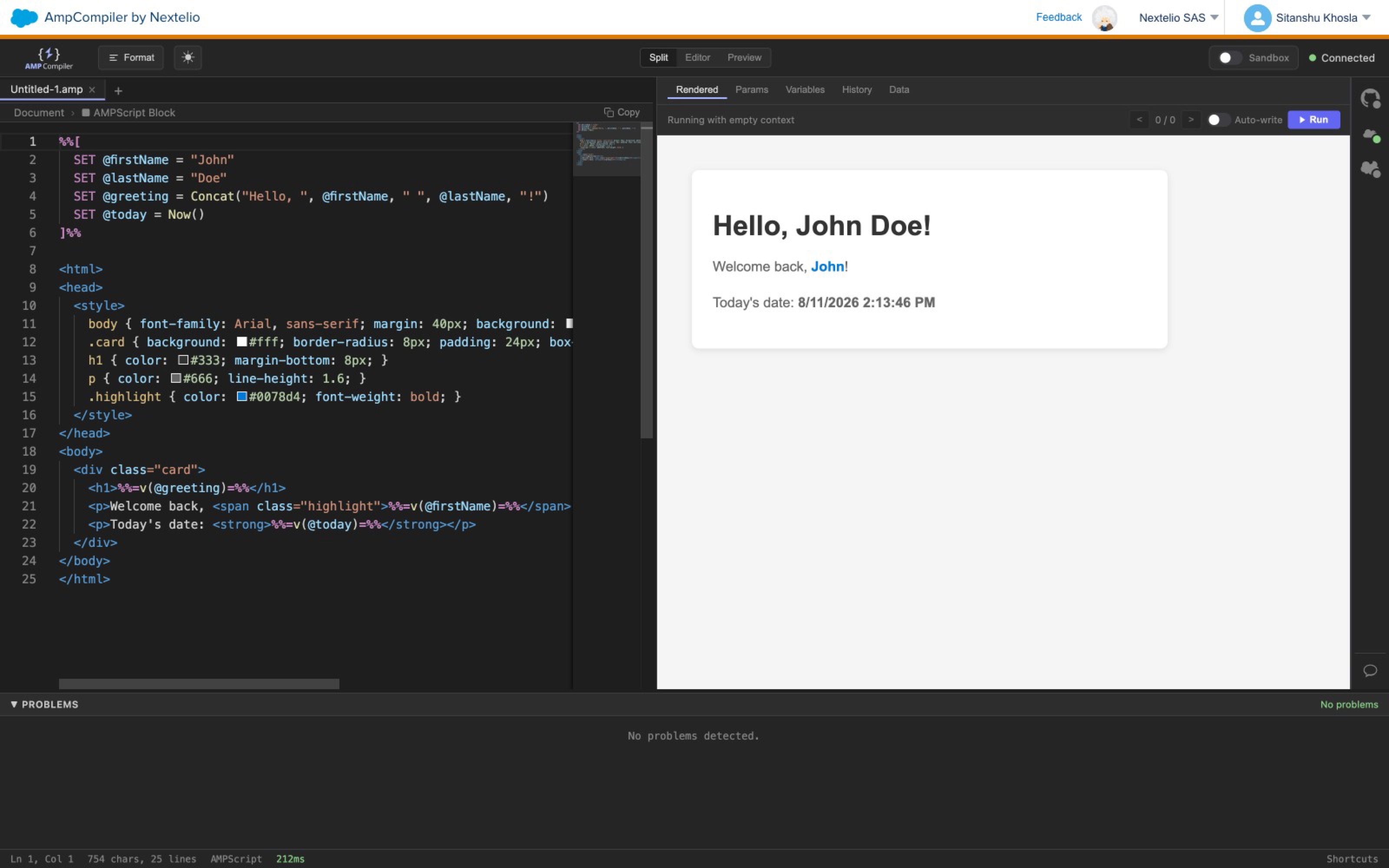
A browser IDE for Salesforce Marketing Cloud. Real-time diagnostics, live execution against your connected tenant, and one-click deploy back to Content Builder. The compiler your team has been building without for a decade.
Get the product →All products
Nextelio AMP Compiler editor with syntax-highlighted AMPscript and live preview
Inside Salesforce Marketing CloudStandalone web appGitHub-native
01Capabilities

The editor SFMC should have had all along.

Everything a Marketing Cloud developer needs, in one place. Nothing they do not.

01

Real-time diagnostics

Errors, autocomplete, hover docs and signature help for 237 functions across AMPscript and SSJS. Nothing surprises you at send time.

02

Live execution against your tenant

Run your script against real Data Extensions and Business Units. Not a paste and hope Cloud Page.

03

Preview as a subscriber

Browse any Data Extension. Pick a row. Run the script with that record bound as the subscriber context.

04

Deploy to Content Builder

One click ships an Email, CloudPage, Code Snippet or HTML Block. Deploy one file or up to twenty at once.

05

GitHub inside the editor

Branches, pull requests, diffs and batch commits. Your SFMC code stops being invisible.

06

Approval-gated writes

Inserts, updates and SOAP invokes ask before touching production. Denied writes are never billed.

02Language coverage

Both languages. One editor.

AMPscript

One hundred and fifty seven functions. Every one covered by autocomplete, hover docs and signature help.

SSJS

Eighty functions. Same treatment. The only IDE that covers both languages in one workspace.

Format

Shift Alt F. Sensible defaults, no configuration to argue about.

Static analysis

Eleven AMPscript rules, five SSJS rules. Catches N plus one loops, unchecked Lookups, deprecated APIs.

03Live execution

Write. Run. Read.

Connect a Marketing Cloud tenant with a single OAuth. Lookup, LookupRows, Retrieve, InsertDE, UpdateDE, ContentBlockByName, HTTPGet, HTTPPost and every SOAP invoke run against the real system, not a mock.

When something breaks, the Problems panel maps seventy known SFMC error patterns to plain language. No more guessing which parameter is missing.

Example

SET @email = Lookup("DE","Email")

Missing required parameter: filter_column and filter_value in Lookup().

04Workflow

Ship it. Version it.

Two things every serious developer expects. Neither has ever been available inside Marketing Cloud until now.

Deploy

Ship to Content Builder

Email, CloudPage, Code Snippet, HTML Block. One click, or twenty. The active file lands in your SFMC asset library with the right assetType and folder, ready to send.

GitHub

Version control that belongs

A full GitHub client inside the SFMC iframe. Branch selector, commit input, pull request list, diff modal, batch commit. Review AMPscript in a pull request like the code it is.

05Where it runs

Where your team already ships.

Install it into Marketing Cloud, or use the standalone web app. Same features, same data, whichever you sign in through.

Package

Inside Salesforce Marketing Cloud

Installed as an SFMC AppExchange package. Signed in through Marketing Cloud's own SSO. Your team never leaves the console.

Web

Standalone at ampcompiler.com

Sign in with Google or email. Same features, no SFMC install required. Ideal for consultancies working across multiple tenants.

06Why we built it

“Marketing Cloud has been the largest developer environment without a proper editor. We built the one it should have had all along.”

The founders

07Frequent questions

Does it work with every Business Unit and Data Extension?

Yes. Once you connect a Marketing Cloud tenant, the editor discovers every Business Unit and Data Extension your account has access to.

Where do our credentials live?

On our infrastructure, encrypted at rest with AES 256 GCM. Only your workspace can decrypt them. We never see the tokens.

Can we deploy to Cloud Pages, not just email?

Yes. Content Builder targets include Email, CloudPage, Code Snippet and HTML Block. Emails, landing pages and reusable blocks all ship from the same editor.

Do you support both AMPscript and SSJS?

Yes. It is the only IDE that covers both languages end to end, including live execution and the shared diagnostic set.

What about writes? Can we test safely?

Every mutating call goes through an approval prompt. Inserts, updates and SOAP invokes ask before touching production, and denied writes are never billed.

Is there a Salesforce Core connector?

Yes. A second OAuth lets AMPscript and SSJS call CreateSalesforceObject, RetrieveSalesforceObjects and UpdateSingleSalesforceObject end to end, without leaving the editor.

Give AMPscript the editor it deserves.

Get the product →Book a walkthrough